

Set up Your Direct Deposit with CFCU
It’s now easier than ever to switch your payroll direct deposit to your CFCU account! All you need to get started is your employer’s name and your login information for your employer’s payroll software. This feature is provided to members at no cost and can be completed in minutes.
Ready to switch? Click the button below or click “See Direct Deposit FAQs” for more information.
Direct Deposit Switch FAQs
Is there a fee to use this Direct Deposit Switch feature?
There is no fee to access or use the direct deposit switch feature within the CFCU Mobile app or using Online Banking. It’s free and simple to set up your direct deposit with CFCU!
How do I access Direct Deposit Switch in the app?
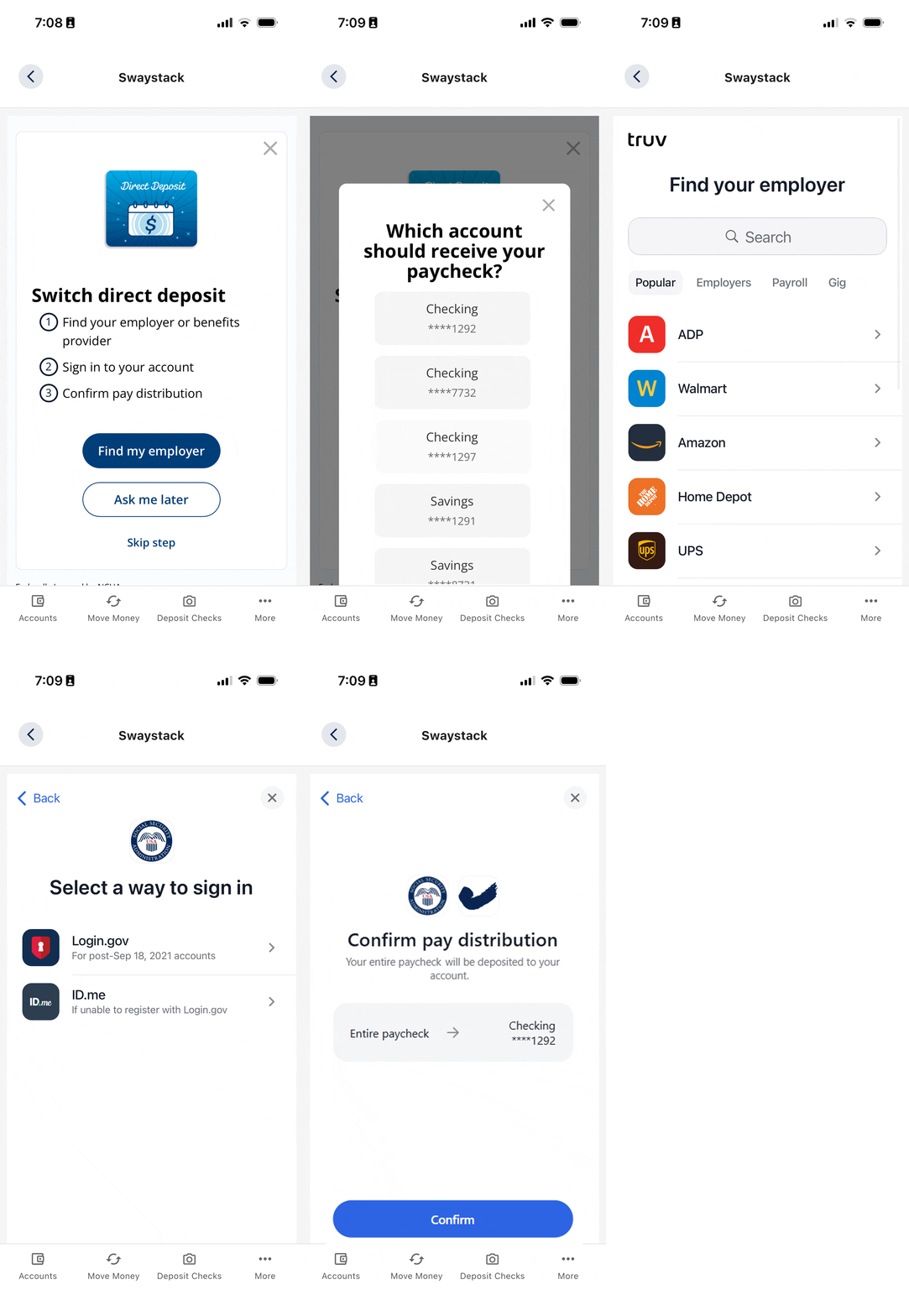
To navigate to the Direct Deposit switch feature within the app, please do the following.
Navigate to the Direct Deposit widget, go to “Move Money” > “Direct Deposit”
Click “Find my employer”
Choose the checking/savings account you would like the deposit to go into.
Search for your employer.
Login with your payroll provider’s login information.
How do I access Direct Deposit Switch in Online Banking?
To access the Direct Deposit widget in Online Banking, please do the following.
Navigate to the Direct Deposit widget, by going under Accounts > Set up Direct Deposit
Click “Find my employer”
Choose the checking/savings account they would like the deposit to go into.
Search for your employer.
Login with your payroll provider’s login information.
Why should I switch my Direct Deposit to CFCU?
When you switch your Direct Deposit to CFCU it makes it even easier to meet your qualifications for our Performance Checking and PayMe Checking products! It also makes it easier to pay for any loans you have with us, allowing for a fast, seamless deposit for your paycheck.
What do I need to set up my Direct Deposit?
All you need to get started is the login info for your payroll provider and access to your preferred 2FA method and you are all set. It’s really that simple!